Restaurant systems

Not just a website. The tools that run the service.

Table booking or pickup ordering on your website, running on a tablet I set up for your staff.

I never take a percentage of your orders or your bookings. One flat monthly price, whether you do 50 or 500.

Which one is yours?

Table booking + host stand

For sit-down restaurants that take reservations, walk-ins and the odd large party.

$499 a month + $1,200 one-time setup, tablet included

Not included today: deposits or no-show fees, automatic confirmation or reminder texts and emails, and a link to your POS. Guests get an on-screen confirmation and a private link to change or cancel.
Online ordering + kitchen screen

For counter-service spots, trucks and takeout-heavy kitchens.

$499 a month + from $1,500 one-time setup, tablet included

Pickup only, paid at pickup. Not included today: online card payment, delivery, a link to your POS, ticket printing, and automatic text or email messages. Tickets show on a separate kitchen tablet.

Need booking and ordering? Add the second system for $150 a month, so $649 in total. Set up together, both are $2,400, with both tablets included. Ask about both

Both systems sit on the Growth plan, which includes your website too. Just need a website? That’s Digital Care.

System one

Table booking + host stand

For sit-down restaurants that take reservations, walk-ins and the odd large party. Replaces the paper book and a per-cover booking app, and cuts down the voicemail callbacks.

$499 a month + $1,200 one-time setup, tablet included

12-month first term. No cut of your bookings, no fee per guest.

Not included today: deposits or no-show fees, automatic confirmation or reminder texts and emails, and a link to your POS. Guests get an on-screen confirmation and a private link to change or cancel.
Your guests

  • Book from your website, seeing only the times that are really open
  • Add a mobile number, allergies and the occasion
  • Change or cancel from a private link, without calling

Your host

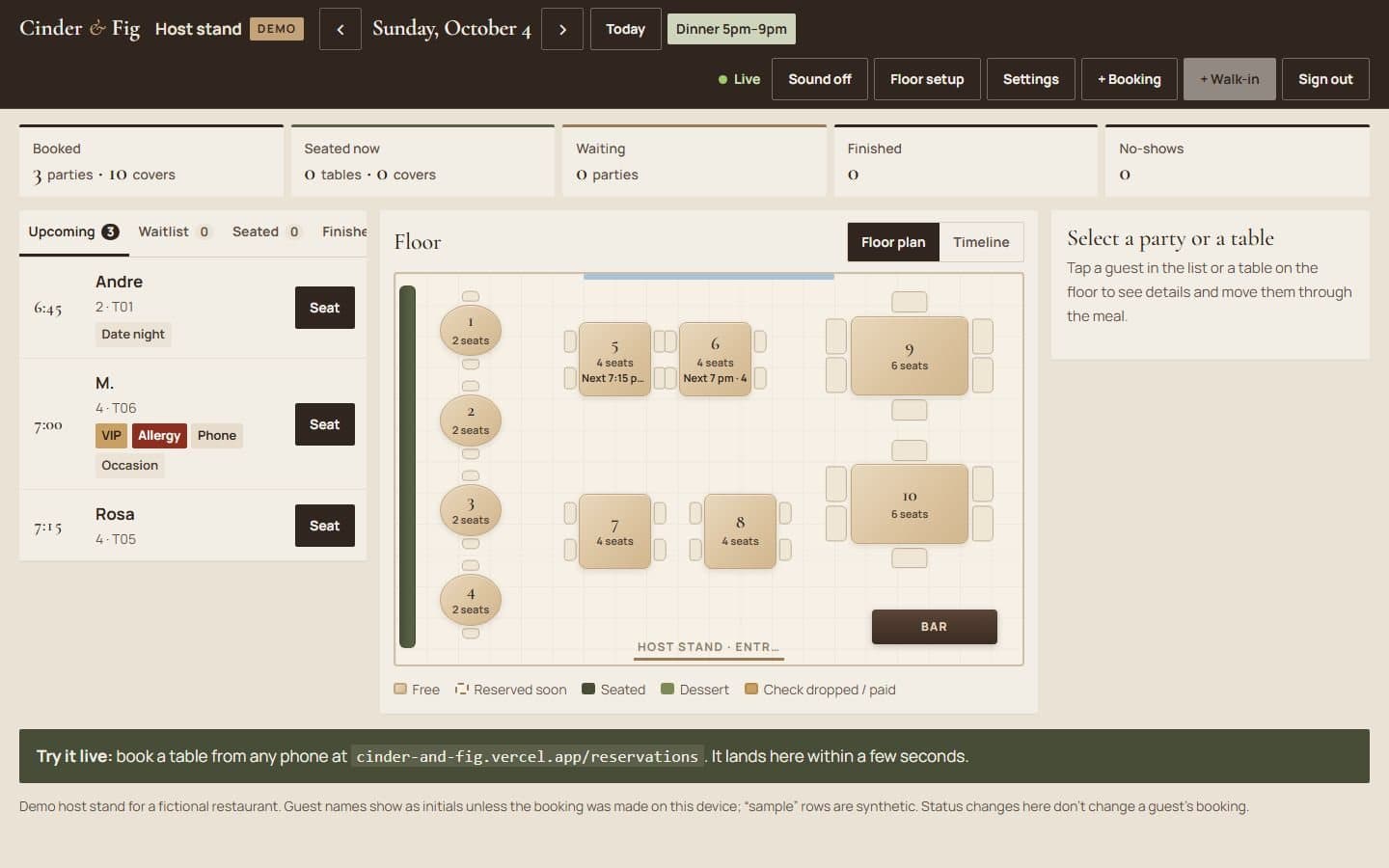
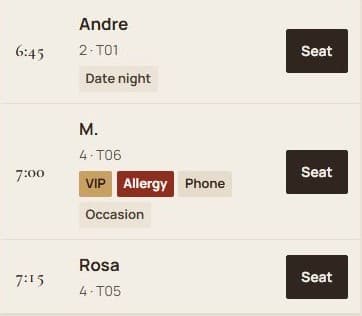
  • Tonight’s bookings, live on a tablet: upcoming, waitlist, seated, finished
  • Your real floor plan, with every table’s state at a glance
  • Seat, move tables, take phone bookings and walk-ins, run a waitlist
  • VIP and allergy flags on every row, and an alert when a guest changes a booking

You, the owner

  • Pause online booking for an hour or the night, and close dates for holidays or buyouts
  • Pacing: cap how many guests can arrive in any 15 minutes
  • A change history on every booking: who did what, and when

I build your floor plan in, by hand

  1. I see your room. A walk-through, or photos and a rough sketch if that’s easier.
  2. I draw every table into the system. Where it sits, how many it seats, and which tables push together for a party of eight. You check it and fix anything I got wrong.
  3. I set up the host stand. A tablet and stand, bought for you and signed in at your host stand, with your hours, party sizes and pacing rules.
  4. We run a test night. Your host takes test bookings, seats walk-ins and runs the waitlist before a real guest books.
  5. I put your Book button where people find you. On your Google listing, Apple Maps and Instagram, all pointing at your own booking page. Each link is tracked, so your monthly report shows how many bookings came from Google.

That’s the one-time Booking Launch, $1,200, and the tablet is yours to keep. See the full scope

The Cinder & Fig host stand: tonight’s guest list with VIP and allergy tags beside a floor plan of ten tables.The Cinder & Fig host stand: tonight’s guest list with VIP and allergy tags beside a floor plan of ten tables.
The host stand on a concept build. Names show as initials unless the booking was made on that device.

Try it on Cinder & Fig, a concept restaurant built to show the system working. The demo runs on sample data that clears itself; your restaurant gets its own setup, tested with your staff before it goes live.

The staff screen needs a PIN. Text me and I’ll send it, or walk you through it live.

System two

Online ordering + kitchen screen

For counter-service spots, trucks and takeout-heavy kitchens. Replaces phone orders read back over the fryer, and paying a marketplace a cut of your pickup orders.

$499 a month + from $1,500 one-time setup, tablet included

12-month first term. No cut of your orders, no fee per order.

Pickup only, paid at pickup. Not included today: online card payment, delivery, a link to your POS, ticket printing, and automatic text or email messages. Tickets show on a separate kitchen tablet.

Your customers

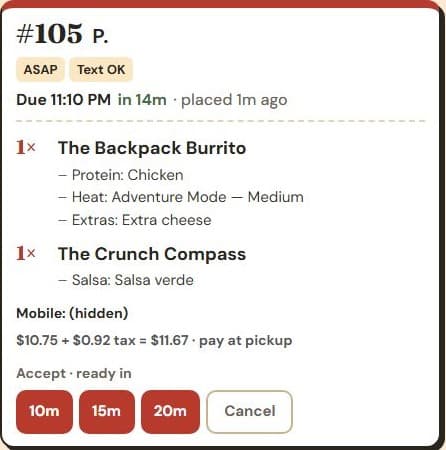
  • Order pickup from your website: ASAP or a set time
  • Choose options and extras, see tax and the total before they order
  • Follow the order live: received, cooking, ready

Your kitchen

  • Tickets appear within seconds with a chime, sorted by pickup time
  • Accept with a ready-in time, which updates the customer’s pickup time
  • Mark ready and picked up, with Undo and Recall for a wrong tap
  • An alarm and a red ticket if an order sits unaccepted

You, the owner

  • An 86 list for items or options (out of guac?), reset every morning
  • Snooze online orders for 20 or 40 minutes, or the rest of the day. It turns back on by itself
  • Today’s orders, sales and average time to ready, plus a log of every ticket change

I set up your menu and your kitchen screen

  1. I enter your menu. Every item, option, price and your tax rate, checked with you line by line.
  2. I set up the kitchen screen. A tablet and stand, bought for you and signed in where the kitchen can see it, with a chime they’ll hear over the line.
  3. I set your rules. Pickup hours, prep times, and how long before an unaccepted ticket turns red.
  4. We run a test service. Real test orders from a phone, accepted, cooked and marked ready by your team before it goes public.
  5. I put your Order button where people find you. On your Google listing, Apple Maps and Instagram, so regulars order from you instead of through an app. Each link is tracked, so your monthly report shows how many orders came from Google.

That’s the one-time Direct Ordering Launch, from $1,500, and the tablet is yours to keep. See the full scope

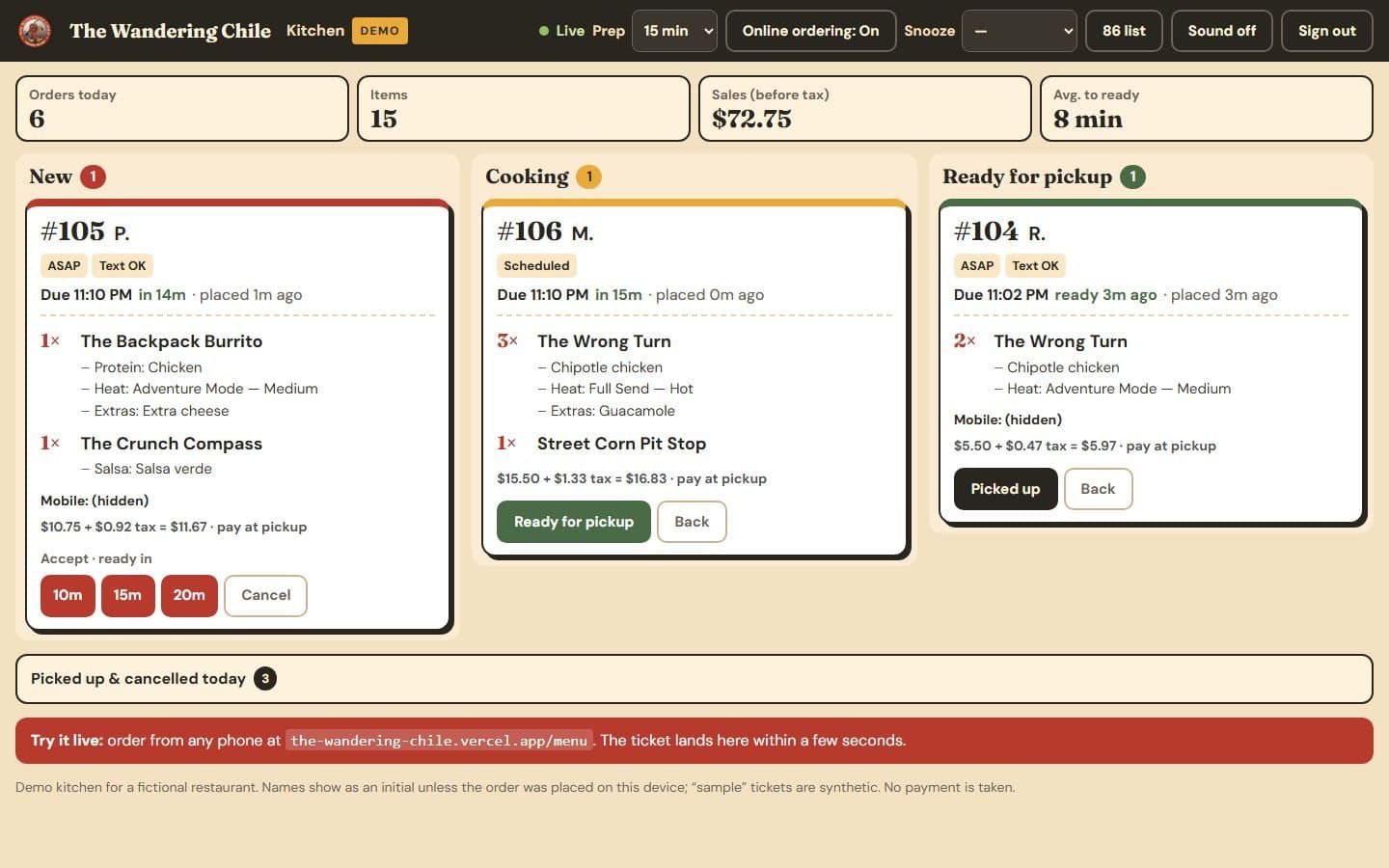
The Wandering Chile kitchen screen: new, cooking and ready columns of pickup tickets with tax and totals.The Wandering Chile kitchen screen: new, cooking and ready columns of pickup tickets with tax and totals.
The kitchen screen on a concept build. “Text OK” means the customer agreed to a ready text; no texts are sent until a messaging provider is connected. Customers pay at pickup.

Try it on The Wandering Chile, a concept restaurant built to show the system working. The demo runs on sample data that clears itself; your restaurant gets its own setup, tested with your staff before it goes live.

The staff screen needs a PIN. Text me and I’ll send it, or walk you through it live.

Percentage vs flat price

The apps take a percentage of every order. I charge a flat price.

Direct ordering is pickup from your own website. It doesn’t replace delivery, or the new customers the apps send you. It gives the people who already know you a way to order pickup without an app taking a cut.

DoorDash and Uber Eats

6–30%

of every order: 6–7% on pickup, 15–30% on delivery, depending on the app and plan. The fee grows with your sales.

Your own pickup ordering

$499/mo

flat, plus a one-time setup from $1,500 (about $624 a month over the first year), plus your normal card processing on orders paid at your counter. The same price at any order volume.

Is it worth it for you? It depends on how much pickup you already do through the apps, and whether regulars would order pickup from you directly. I can’t promise anyone switches from delivery, so I don’t put a savings number on this page. Text me your monthly app totals and I’ll work it out with you, including when the website-only plan is the better buy.

What the apps charge, from their own pricing pages
What the two biggest apps charge restaurants (their own pricing pages, October 2026)
AppOrder typeTheir cut
DoorDashDelivery orders15%, 25% or 30% of each order, by plan
DoorDashPickup orders6% of each order
Uber EatsDelivery orders20%, 25% or 30% of each order, by plan
Uber EatsPickup orders7% of each order
foundosPickup from your website0%. A flat monthly price, plus your normal card processing.

Busy nights break things. Here’s what happens.

The questions owners ask before trusting a system with a Friday night, and what these systems do about them.

See all 13 answers
When…What happens
Two guests try to book the last table at the same momentBookingOne gets it. The other is shown the closest times still open, so the same table can’t be booked twice.
A customer taps “Place order” twice, or their signal dropsBooking + orderingOne booking or order, not two. A retry finds the one that already went through.
The bag changes after they tapped “Place order”OrderingThe old attempt can’t be replayed with the new bag. They review it and place it once.
The kitchen runs out of something mid-shiftOrderingTap it on the 86 list. It can’t be ordered until you turn it back on, and the list clears for the next day.
The kitchen is slammedOrderingSnooze online orders, or turn up the prep time so new orders quote a later pickup.
An order sits and nobody has accepted itOrderingAfter two minutes the ticket turns red, a banner names it and the chime repeats until someone taps it.
The kitchen tablet dies or loses Wi-FiOrderingIf no kitchen screen has checked in for three minutes, online ordering switches itself off, so no order goes unseen.
Two screens tap the same ticketOrderingThe second tap is refused with “already moved on another screen”, instead of quietly overwriting.
Someone bumps or cancels the wrong thingBooking + orderingUndo on the spot, or Recall from the finished list. Cancelled bookings can be restored if the table is still free.
A guest changes or cancels their booking onlineBookingThe host stand flags the row and says so. Once a party is seated, they can’t change it online any more.
Something looks wrong and you need to know who did itBooking + orderingEvery booking and ticket keeps a history: who, what and when, signed with the name on that screen.
A holiday, a buyout or a stormBookingClose the date or pause online booking in two taps. Phone bookings and walk-ins still work.
Someone tampers with prices on their phoneOrderingEvery price and the tax are worked out again from your menu when the order arrives. What their phone says is ignored.

Straight answers

Your data, support, and what isn’t included

Your guests stay yours

Bookings, orders and guest details live in a database for your restaurant, not on a marketplace that markets other restaurants to your guests. Staff sign in with your PIN and their own name, and every change is logged under that name.

Support hours, and if it goes down

Monday to Friday, 9am to 5pm Eastern. A broken site or form has an urgent route. On Growth, I acknowledge requests within one business day. There’s no evening or weekend on-call today.

If a screen or the internet drops during service, online ordering pauses itself after three minutes so no order goes unseen, and phone orders, phone bookings and walk-ins carry on as normal. Text me and I’ll fix it in support hours.

Not included today

  • Text and email messages. No confirmations, reminders or “ready” texts are sent. Guests get an on-screen confirmation and a private link. Ordering asks for consent to a ready text, so it can be switched on with a messaging provider, billed separately.
  • Online card payment. Ordering is pay at pickup, and booking takes no deposits or no-show fees.
  • Your till (POS) or a ticket printer. Tickets show on the kitchen screen, on a tablet.
  • Delivery. Ordering is pickup only.
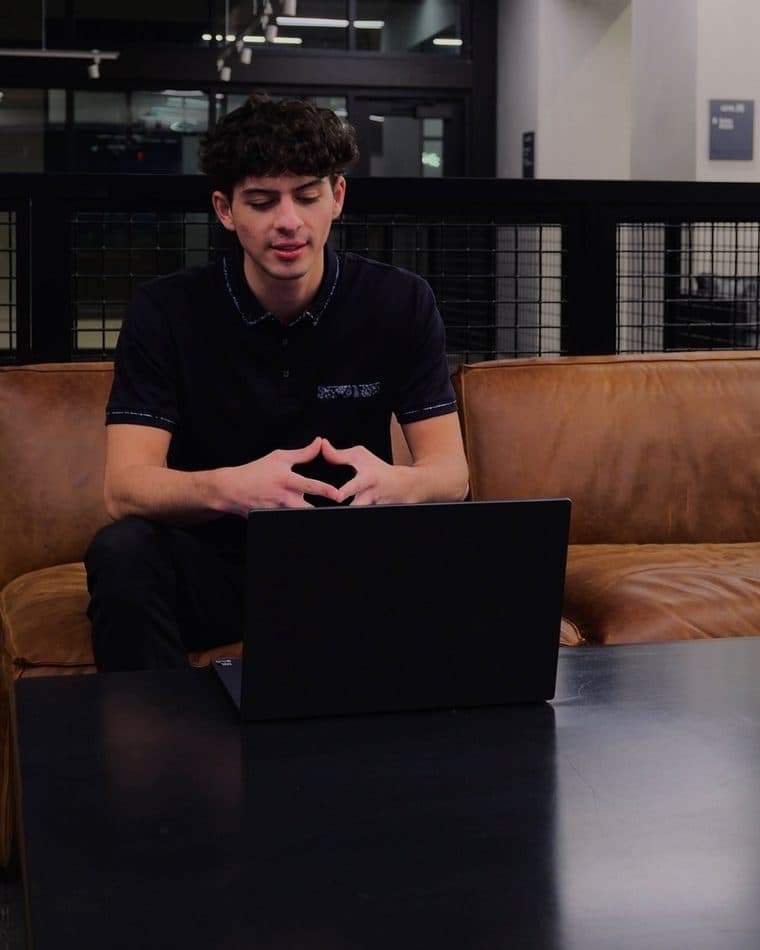
Josh Potesta at work

Want to see it on a real Friday?

Text me. I’ll walk you through the host stand or the kitchen screen live, with your menu or your room in mind, in about fifteen minutes.